The blank page stares back, a symphony waiting to be written, but the chords just aren't clicking. For countless musicians, producers, and aspiring songwriters, this is a familiar wall. Thankfully, the world of music technology has gifted us an ingenious solution: chord progression generators. These powerful tools, designed to unlock creativity and streamline the songwriting process, come in many forms, each boasting unique types and features of chord progression generators that cater to different needs and skill levels.
Whether you're a seasoned pro hitting a creative block or a beginner dipping your toes into music theory, understanding these generators is key to transforming a blank canvas into a vibrant soundscape.
At a Glance: Your Guide to Chord Progression Generators
- Overcome Creative Blocks: Generators offer fresh ideas, helping you bypass writer's block and explore new harmonic territories.
- Learn Music Theory: Many tools visualize scales, keys, and chord relationships, making complex theory tangible and easier to grasp.
- Accessibility for All: Even without strong piano skills or deep theory knowledge, you can create professional-sounding progressions.
- Diverse Formats: From standalone plugins and web apps to integrated DAW features and AI-driven assistants, there's a generator for every workflow.
- Key Features to Look For: MIDI detection, sequencing, customization, genre presets, advanced arpeggiators, and seamless DAW integration.
- Not Just for Beginners: Pros use them for quick prototyping, complex harmony exploration, and sparking unexpected inspiration.
The Modern Musician's Secret Weapon: Why Chord Progression Generators Matter
At their core, chord progression generators are digital assistants that craft musical harmony. They leverage music theory rules to suggest compatible chords, forming sequences that sound pleasing and evoke specific emotions. Think of them as a highly knowledgeable, infinitely patient music theory guru living inside your computer. They output MIDI data, which can then be played by any virtual instrument (VST) in your digital audio workstation (DAW), whether it's for guitar, piano, synths, or a full orchestra.
Their utility extends far beyond just "making chords." They're invaluable for:
- Sparking Inspiration: When you're stuck in a rut, a generator can provide a launchpad for an entirely new track.
- Democratizing Music Creation: They level the playing field, allowing anyone to create compelling music regardless of their formal training or instrument proficiency.
- Efficient Workflow: Quickly audition hundreds of harmonic possibilities without painstakingly entering notes, saving precious creative time.
- Deepening Understanding: By showing you why certain chords work together, they reinforce music theory concepts in a practical way.
Now, let's dive into the fascinating array of types and features these tools offer.
Understanding the Landscape: Core Types of Chord Progression Generators
Chord progression generators aren't a monolithic category. They range from simple, web-based tools to sophisticated DAW plugins and even AI-powered assistants. Here’s a breakdown of the main types you'll encounter:
1. Dedicated VST/AU Plugins: The Powerhouses of Your DAW
These are software instruments or MIDI effects designed to run directly within your DAW (like Ableton Live, Logic Pro, FL Studio). They offer the most integration and often the deepest feature sets.
- Scaler 2: A standout in this category, Scaler 2 is lauded for its comprehensive capabilities. It can load 400 song/genre-based and over 200 artist chord sets, providing an immediate source of inspiration. Its innovative MIDI/audio detection identifies the scale and key of existing music, then suggests compatible chords. The Edit Mode allows for granular adjustments to each chord's length, inversion, velocity, octave, and timing, offering precise control. Scaler 2 is often cited as excellent for original composition or seeking inspiration, with a beginner-friendly interface that doesn't sacrifice depth.
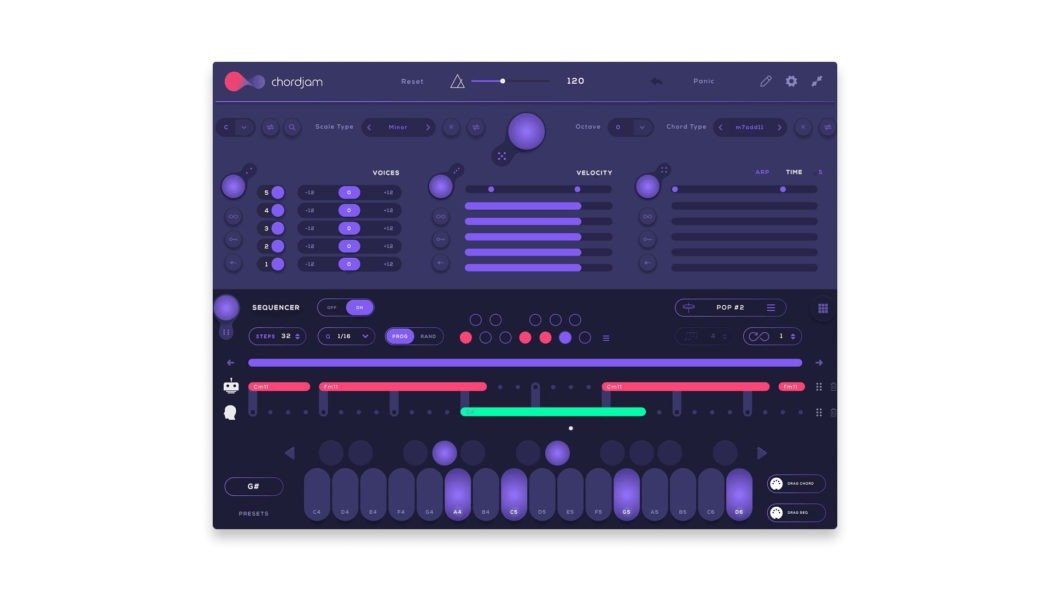
- Chordjam: This plugin introduces a unique sequencer engine to dictate how chords are played, not just what chords are used. It can function as a MIDI effect or be directly modified within your DAW, making it ideal for breaking out of musical ruts by adding rhythmic complexity to your harmonies.
- Chordprism: Focused on professional harmony and melody work, Chordprism generates full chords based on a selected scale and played note. It boasts a wide range of genre-based presets and a robust Editor tool for crafting inversions, voicings, extended/altered chords, and individual note adjustments. Its Step Sequencer applies rhythmic patterns, Smart Scale maps notes to white keys for easier playing, and Multi Arp creates complex arpeggios. With drag-and-drop MIDI export and multi-instrument performance capabilities, its keyboard-centric design makes it powerful for both quick ideas and deep harmonic exploration.
- Captain Chords (and Captain Chords Epic): Part of the Mixed In Key suite, Captain Chords features a built-in piano roll, 100 rhythms, and 249 sounds. It excels at progression customization and includes rhythm presets, identifying MIDI controller input and offering a strum option. Its "fuss-free" interface and simple drag-and-drop MIDI export make it accessible. The professional version, Captain Chords Epic, takes it further with genre-categorized progressions, an intuitive workflow, advanced rhythm generators, and arpeggiators. It includes settings for adding complexity and velocity, its own sound library with presets, and sound design controls, all manageable via MIDI keyboards.
- InstaChord 2: A MIDI processing plugin that integrates an AI-powered chord sequencing tool and pattern generation, complete with presets. Its Pattern Editor offers extensive control over strums, chord playback, time signature, play mode, velocity, and creative strum programming. This tool provides top-notch functionality, especially for experienced music-makers looking to enhance their skills.
- Riffer (Audiomodern): More of a creative MIDI sequencer, Riffer generates randomized riffs and composes patterns. It produces full chords from single notes, which can be modified by pitch, velocity, density, and duration. Users can lock parameters, save scales/patterns, and transfer MIDI. It features 53 scales (from Western to Eastern), motion settings, sequence range customizations, and advanced MIDI connectivity. Its Polyphonic Mode allows up to 4 notes simultaneously, making it a lightweight yet feature-rich plugin for quick, high-quality results.
- Chordz (Free VST): An excellent entry point for those on a budget, Chordz is a free tool that triggers full chords from single-note inputs. It supports custom templates, allows editing existing ones, and includes a library of 50 chord types and 40 scale/chord templates. Features like velocity scaling and randomization are included. Complex progressions can be played with a single finger on a MIDI keyboard/drum pad or by assigning chords to a single piano roll note, making it one of the easiest interfaces to navigate for practicing music theory and composition.
- Xfer Cthulu: A legendary and early chord progression generator, Cthulu is essentially a vast MIDI pack library with easy navigation. It's known for its Bach chorale-inspired MIDI packs and was developed with input from Deadmau5, making it particularly suitable for EDM producers comfortable with its older interface.
2. Standalone & Web-Based Generators: Instant Access, Anywhere
These tools live outside your DAW, often in a web browser or as a dedicated application. They're great for quick ideas, learning, or users who prefer not to clutter their DAW with too many plugins.
- LANDR Composer: This versatile generator boasts numerous settings and an intuitive interface. It can generate chord progressions in specific keys, scales, modes, or styles, and easily creates complex extended chords and inversions. Beyond chords, it functions as a powerful arpeggiator with deep control over patterns, chords, note velocities, and can even generate polyrhythmic arpeggios, making it a comprehensive tool for any songwriter.
- ChordChord: A relatively new, browser-based AI tool, ChordChord allows you to select and generate chord ideas, and uniquely, also generate drum patterns. It offers customizable output and allows MIDI chord and drum pattern downloads upon signing up, making it a useful online resource for sketching out full ideas quickly.
- Generic Beginner Generators: Many simple, unnamed generators exist online, designed for users without music theory knowledge. They typically generate piano and guitar chord progressions by simply selecting a key, offering main and alternative progressions for choruses or bridges. With features like tempo switching and a barebones, easy-to-use interface, they serve as excellent sources of inspiration or practice for new musicians.
3. AI-Driven & Conceptual Tools: The Cutting Edge
Leveraging artificial intelligence, these tools push the boundaries of creative assistance, often providing more nuanced or text-based inspiration.
- ChatGPT: While not a dedicated MIDI generator, ChatGPT is an AI tool capable of generating chord progression ideas from text input. You can describe a mood, genre, or key, and it will provide suggested chord sequences (e.g., "Give me a melancholic jazz progression in C minor"). While it doesn't generate MIDI files directly, it's a free and powerful source of inspiration and can also assist with lyric writing.
4. DAW-Native & MIDI Packs: Built-In & Ready-Made
Sometimes the best tools are already at your fingertips or are readily available as pre-made resources.
- Ableton Live's Built-in Functionality: While primarily a DAW, Ableton Live offers impressive built-in chord and scale functionality for generating progressions. Its capabilities are significantly enhanced when paired with the Ableton Push 2 controller, which provides an intuitive tactile interface and automatic mapping to scales and chords. Furthermore, Max for Live extensions can expand its chord generation tools even further, making Ableton a powerful, integrated option.
- MIDI Chord Packs: These are collections of free, pre-generated chord progressions that users can drag and drop directly into a DAW's MIDI roll. Once in your DAW, you can play them with any VST instrument. They offer a quick and effective way to explore new chord ideas without any complex setup or processing.
Key Features to Look For in a Chord Progression Generator
When choosing a generator, it's not just about the type, but the specific features that align with your workflow and creative goals. Here's a deeper dive into the functionalities that set these tools apart:
1. Intelligent Chord Suggestion & Generation
The fundamental feature of any generator is its ability to create chords.
- Scale and Key Detection (e.g., Scaler 2): Advanced generators can analyze existing audio or MIDI to determine the underlying key and scale, then suggest chords that fit perfectly. This is invaluable for remixers or those building on an existing melody.
- Genre-Specific Presets (e.g., Scaler 2, Chordprism, Captain Chords Epic): Many tools offer libraries categorized by genre (pop, jazz, EDM, R&B) or mood, providing a quick starting point tailored to a specific style.
- Smart Scale Mapping (e.g., Chordprism): Maps notes within a chosen scale to white keys on your MIDI controller, making it impossible to play "wrong" notes and simplifying exploration.
2. Progression Customization & Editing
Raw chord suggestions are just the beginning. The ability to fine-tune and personalize is crucial.
- Edit Mode (e.g., Scaler 2): Allows precise control over individual chord parameters like length, inversion, velocity, octave, and timing.
- Editor Tool (e.g., Chordprism): For creating complex harmony, this tool is essential for crafting inversions, voicings, extended chords (e.g., 7ths, 9ths), and altered chords.
- Velocity Scaling & Randomization (e.g., Chordz): Adds human-like dynamics by subtly varying note velocities, preventing a robotic feel.
- Custom Templates (e.g., Chordz): The ability to save your own chord patterns or build custom chord/scale templates allows you to reuse favorite harmonies.
3. Rhythm, Sequencing & Arpeggiation
Beyond just chords, how they are played rhythmically adds life to a progression.
- Sequencer Engine (e.g., Chordjam, Chordprism, Riffer, InstaChord 2): Determines the rhythmic playback of chords, allowing for complex patterns, arpeggios, or strumming.
- Rhythm Presets/Generator (e.g., Captain Chords, Captain Chords Epic): Offers pre-made rhythmic patterns to apply to your progressions, instantly adding groove.
- Arpeggiator (e.g., Chordprism, Captain Chords Epic, LANDR Composer): Breaks down chords into individual notes played in sequence, creating dynamic and often complex melodic textures. Advanced arpeggiators can even generate polyrhythmic patterns.
- Strum Option/Programming (e.g., Captain Chords, InstaChord 2): Simulates realistic guitar or piano strumming, adding organic movement to block chords.
4. Workflow & Integration
Seamless integration with your existing setup is a huge benefit.
- Drag-and-Drop MIDI Export (e.g., Chordprism, Captain Chords, ChordChord, Riffer): The ability to simply drag the generated MIDI directly into your DAW's piano roll is a massive time-saver. This feature is often highlighted as a core advantage, allowing you to quickly generate your own chord progressions and integrate them.
- MIDI Connectivity (e.g., Riffer, Captain Chords Epic): Allows your MIDI keyboard or controller to influence the generator's output or control its parameters.
- Multi-Instrument Performance (e.g., Chordprism): The ability to assign generated chords to multiple virtual instruments simultaneously, creating rich, layered arrangements.
- DAW Integration (e.g., Scaler 2, Ableton Live): How well the plugin or feature works within your specific DAW, including auto-mapping, sidechaining, or routing options.
5. User Interface & Learning Curve
The best features mean little if the tool is too difficult to use.
- Beginner-Friendly Interface (e.g., Scaler 2, Chordz, Generic Beginner Generators): Tools designed for new users often have simplified controls and visual aids to help understand music theory concepts.
- Keyboard-Centric Design (e.g., Chordprism): Optimized for use with a MIDI keyboard, allowing for intuitive real-time interaction and improvisation.
- Fuss-Free Interface (e.g., Captain Chords): Emphasizes ease of use and quick results over deep customization for certain scenarios.
How to Choose the Right Chord Progression Generator for You
With so many options, how do you pick the best fit? Consider these factors:
- Your Skill Level:
- Beginner (No Theory Knowledge): Look for tools like Chordz, Generic Beginner Generators, or Scaler 2 (with its beginner-friendly mode). They simplify theory and offer immediate results.
- Intermediate (Some Theory, Want to Learn More): Scaler 2, Chordprism, and LANDR Composer are excellent for deepening your understanding while still providing inspiration.
- Advanced (Producers, Composers): Chordprism, InstaChord 2, Riffer, Ableton Live's native tools, and Captain Chords Epic offer the depth and flexibility required for complex productions.
- Your Workflow & DAW:
- Plugin Integration: If you prefer working entirely within your DAW, VST/AU plugins like Scaler 2, Chordjam, or Captain Chords are ideal.
- Standalone/Web-Based: For quick ideas, learning, or working on the go without your main music setup, LANDR Composer or ChordChord are great.
- Ableton Live User: Leverage Live's built-in tools, especially with a Push 2 controller, or explore Max for Live extensions.
- Your Budget:
- Free Options: Chordz, MIDI Chord Packs, ChatGPT (for ideas), and many generic web generators offer fantastic value for no cost.
- Paid Plugins: Most of the powerful, feature-rich generators (Scaler 2, Chordprism, Captain Chords) are paid but often come with trial versions to test before you buy.
- Your Primary Goal:
- Overcoming Creative Blocks: Scaler 2 (with its genre sets), Chordjam (rhythmic ideas), or Riffer (randomized patterns) are great for sparking new directions.
- Learning Music Theory: Chordz and Scaler 2 visually demonstrate chord relationships and scales.
- Building Complex Harmonies: Chordprism and InstaChord 2 offer deep editing for inversions and voicings.
- Quick Prototyping/Sketching: Drag-and-drop tools like Captain Chords or MIDI Chord Packs are perfect.
- Adding Rhythmic Variety: Chordjam, Riffer, and the arpeggiator features of LANDR Composer or Captain Chords Epic excel here.
Beyond the Generator: Making Music Your Own
While chord progression generators are incredibly powerful, they are tools, not replacements for human creativity. Here are a few thoughts on how to leverage them effectively:
- Use as a Starting Point: Don't feel obligated to use a generated progression exactly as it is. Treat it as a foundation, then modify, re-voice, or adapt it to your unique vision.
- Experiment and Explore: Don't stick to just one generator or one genre. Play around with different settings, scales, and even unconventional combinations to discover new sounds. You can easily generate different chord progressions and compare them.
- Learn Along the Way: Pay attention to why the generator chooses certain chords. Many tools visualize the underlying theory, helping you internalize concepts like chord functions, diatonic harmony, and common progressions.
- Combine with Other Elements: A great chord progression needs a melody, a compelling rhythm, and thoughtful arrangement. Use the generator to free up mental space so you can focus on these other crucial aspects of your music.
- Break the Rules: Once you understand the "rules" the generators follow, you're better equipped to intentionally break them, adding tension or surprise to your music.
Whether you're crafting a chart-topping hit or simply exploring the joy of harmony, understanding the diverse types and features of chord progression generators will undoubtedly enhance your musical journey, helping you to create, learn, and inspire with greater ease and efficiency. The next time you face that blank page, know that a world of harmonic possibilities is just a click away.